

Photoshop Templates for Facebook’s Timeline Redesign
These templates are for personal profiles only
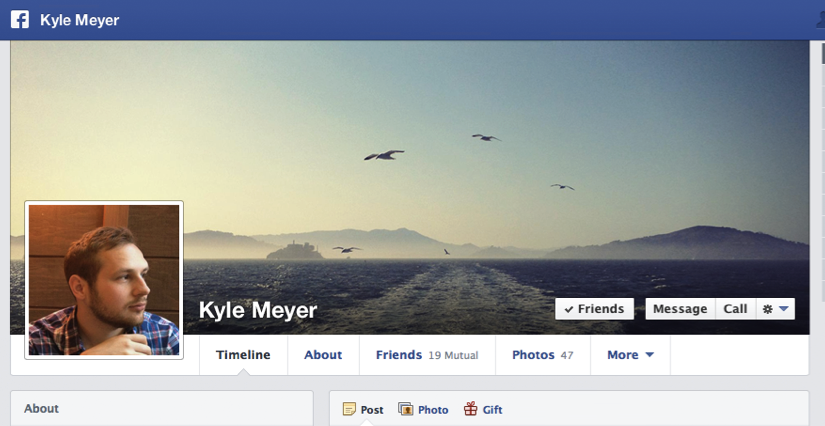 As you can see from the screenshot, the profile photo is much higher than before and a bit to the left.
My measurements for the location of the profile photo (with 5px frame) are 173px from the top and 15px from the left.
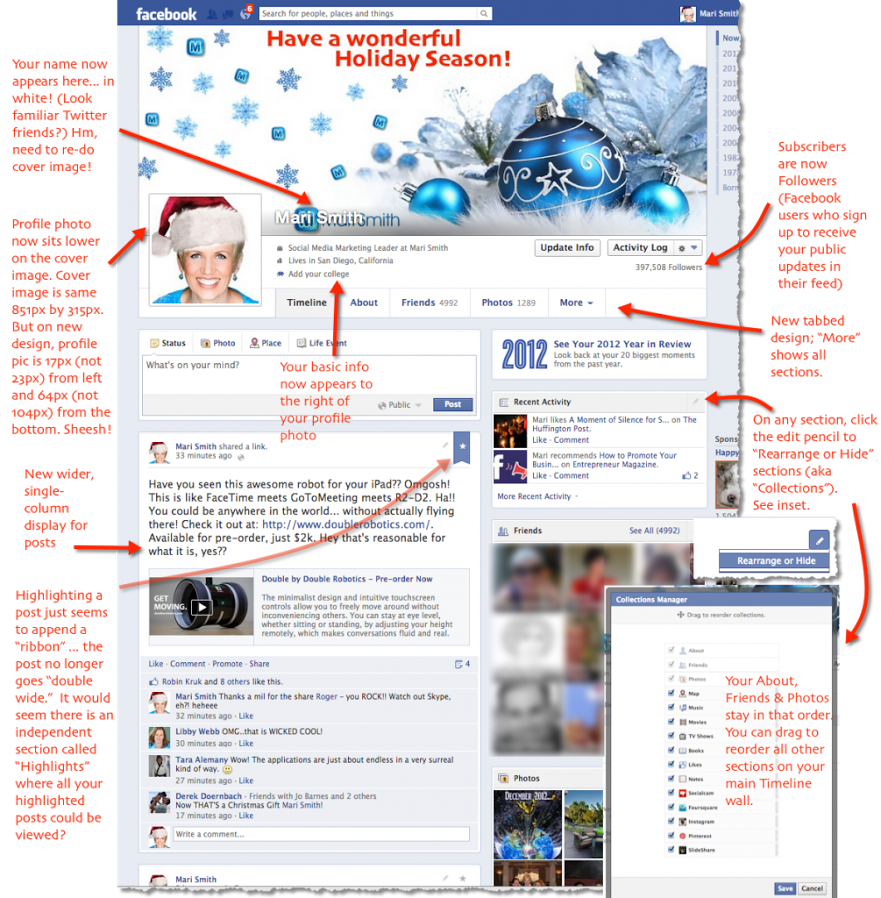 I heard a few weeks ago that Mari Smith had seen a new design for Facebook’s Timeline and held off on updating my Photoshop templates until I felt the layout was final and the change was imminent…
Yesterday I read Search Engine Journal’s post saying that the new layout was rolling out in New Zealand so I got to work. I have two templates this time, one that is the normal 851×315 for when you only need to create the cover photo itself and a larger one that is 1233px wide for when you want to make an “integrated” cover photo and profile image.
Cover Photo Only Template
 Use this template when you’re only concerned with creating a cover photo. Profile images are uploaded at 180x180px and then Facebook shrinks them down to 160x160px. The main reason I even have a template for this is that I like to know exactly where the profile image is and what it’s going to cover up.
Integrated, or Seamless Cover Photo & Profile Image
 This template is 1233px wide and is great when you want your cover photo and profile image to seem like they are one image. There are lots of great examples out there so get creative! I would love to see your work so please post links to your Facebook pages in the comments so we can share them.
Mobile App Preview
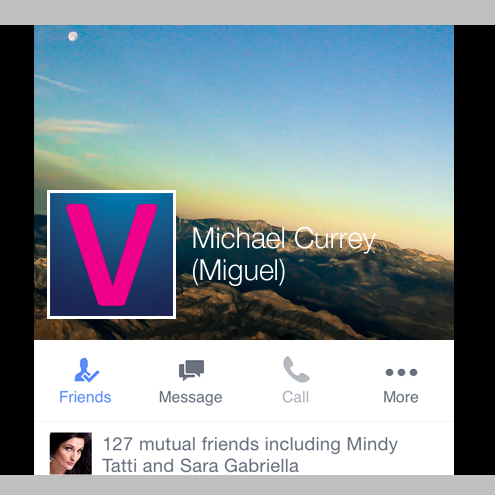 [Updated March 20, 2014] As always there’s been an update to the design of Facebook profiles on mobile (iOS).
There is a big difference in how your cover photo will look on mobile vs desktop.
I have included an extra layer group in the Photoshop file that will give you a preview of how your cover photo will be displayed. It’s not pretty. It basically gets cropped off on the sides. If there’s something really important you want people to be able to see, make sure it’s in the center of your cover photo.
Facebook Profile Image Cropped or Scaled?
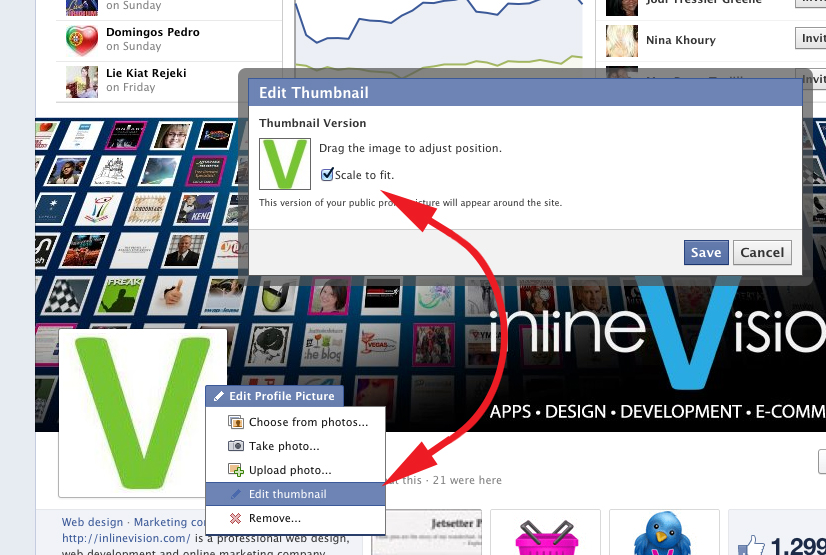 There is a setting to control whether your profile image is displayed at 180×180 and cropped or scaled down to 160×160. The template for the “integrated” design is based on the idea that your profile image gets scaled down, if you see that your profile image is not lining up with your cover photo you probably need to edit the setting.
When you hover your mouse over your profile image you will see a pop-up to “Edit Profile Picture”. Click on it and you will see a menu of options. Select “Edit Thumbnail”. You will see a checkbox to “Scale to fit” in a pop-up window. If the box is not selected you will be able to “Drag the image to adjust position”. Select “Scale to fit”.

About the author:
Michael Currey is an experienced web designer, front-end developer and social media manager with 15 years of experience and an education from the Academy of Art University in San Francisco.
25 Responses to “Photoshop Templates for Facebook’s Timeline Redesign”
Leave a Comment
2 Trackbacks
- Facebook Timeline Cover Photo and Profile Image Sizes | InlineVision: Web Design / E-Commerce / PPC / Social Media | Las Vegas, NV
[…] I have released new templates that work for both the “original” Timeline and the “updated” Timeline […]
- Choosing the best image size for facebook photo posts » FAQs & Blog | InlineVision: Web Design / E-Commerce / PPC / Social Media | Las Vegas, NV
[…] are an abundance of blog posts detailing the sizes of images for Facebook Cover Photos, App Icons, Event Covers, Ad images and more; but until recently I had not thought much about what […]
Search
-
Latest Articles
-
 Jul 17, 2021
Woocommerce Security Woos
-
 Apr 15, 2020
Citibank and Other Bank Scam Text Messages
-
 Mar 6, 2020
Hostgator Account Phishing Emails
-
More From Our Blog


Great information Michael, thank you.
Happy to share. Let me know how your page comes out.
Thanks for this Michael! I’m so glad I stumbled upon your site. Great stuff.
You’re welcome. Glad to have you :)
[…] I have released new templates that work for both the “original” Timeline and the “updated” Timeline […]
Thank you. I really appreciate your work!
Thankyou for free template
Perhaps I’m being daft, but the templates I downloaded from the emailed link are for the old (existing) dimensions, not for the new timeline format currently trialling in NZ and shown in your sample JPGs.
I’m not in NZ, so the “old” dimensions are exactly what I need for right now — thank you! But did you intend to release an updated version of the templates too? It would be great to get ahead of the game on updating my cover images and profile pics for when the new format rolls out to the rest of the world.
Did you get timeline-redesign-templates-20-percent-grid_v2.zip?
This file has one layer labeled “original timeline mask” and a layer group labeled “updated timeline mask”. To design for the new Timeline layout that has rolled out in NZ you need to hide the “original timeline mask” and use the “updated timeline mask” as a guide.
See, that’s what I get for being a complete Photoshop newbie and doubting a pro…!
I see the two layers now — and should really have seen them before. Thanks for spelling it out for me!
Thanks so much for the templates and the info. I appreciate you sharing.
Thanks! Not sure I like the automatic “gradient” fbook puts in at the bottom. Great template. Worked first time.
I love the new template.. I’m still trying to get it to properly work… When I upload the 180×180, it looks for a brief second that it lines up perfectly, then facebook resizes it and it’s off a bit.
Sometimes there’s a glitch on Facebook where the profile photo is displayed and it’s regular size (180×180) inside the 160×160 box and it messes everything up… It seems to come and go with no explanation.
I’ll try this template, and if all goes well, I’ll post a link for you to see how it went. I’ve been searching everywhere for a template that can help me do a profile+cover style (the ones that seem to be one image), but I always ended up with a profile picture with a higher resolution haha. Thanks for sharing!
Awesome, looking forward to it!
http://www.facebook.com/casey.kleypas
Nice! Mind if we share a screenshot on our social sites?
Hi, your work looks great. Thing is i know little about photoshop. Could you (or anyone else) explain step-by-step how to use the template for people like me ? I’d like to do something just like Casey K did.
Sorry for the last post, i’ve finally managed to get it work!
Hi, Michael
Thanks for the Cover Temlate… I will let you know how it turns out… :D
Not good, the profile picture is not made to measurements.. Facebook keeps telling me that the profile picture must be at least 180 pixels wide..
Hi Michael,
Thanks for the great template.
Question: Where can I find the ‘Action’ file to export the images? In the old PSD-template I had an ‘Action’
Thank you,
Tom
I’m not sure where you got that action… I’ve never set one up for any of my templates. Might be a good idea though ;)
Worked Great, Thanks!
[…] are an abundance of blog posts detailing the sizes of images for Facebook Cover Photos, App Icons, Event Covers, Ad images and more; but until recently I had not thought much about what […]
Thank you sir for the updated timeline templates!